Devlog#4 Using Custom Resources For Data Driven Tilemaplayer Generation
Using Custom Resources for Data-Driven TileMapLayer Generation Link to heading
Greetings, fellow traveler. Ever thought how you could do more with your TileSets ? Grew tired of placing your hand-crafted Patterns randomly ?
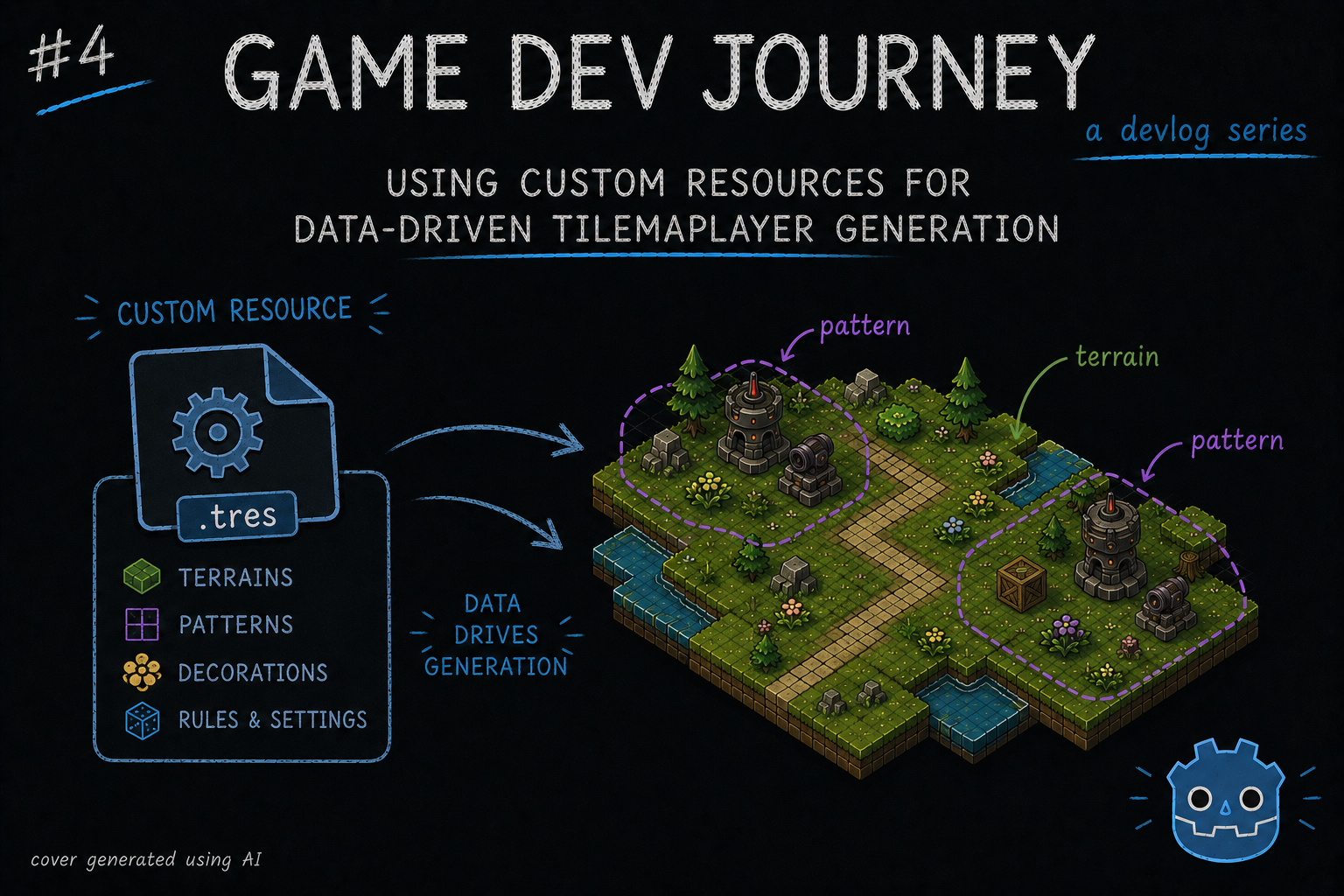
Then this blog post might be for you! In this week’s blog post I write about Godot’s Custom Resources and how I started shaping my city layout generation to be more data driven, and less random.
Keeping with the theme of the last few blog posts, I keep improving on my layout generation algorithm until I have a version I’m comfortable with (not a “final” version, as I fully believe I will be tweaking this every now and then)
Then how do you know when it’s “good enough” ?
Probably when I am able to press one button, look at the result and go “hey, not half bad!”. Which might be checks calendar someday!
However, for this post I want to focus less on the algorithm itself, and more on the Custom Resource I created that enables me all the improvements I want. And what is this, you ask ?
In the same way that Godot stores some of its info in Resources (images, audio files, 3d models, etc), we can expand on this system and create our own types of Resources.
Not following. What is a Resource to begin with ?
Fair question. The full explanation is in the official docs but, to keep it simple, its a special kind of class, intended for saving and storing data and less for doing the pretty things (example : a scene with all our buttons). Among all the advantages, the two I’d like to highlight are:
- Godot handles all serialization-related work for us (via
ResourceSaverandResourceLoader) - We can quickly edit the data via Godot’s
Inspectorpanel
Ooh. So instead of me handling json read/write, I can use this right out of the gate ?
Yup. And as much as I like using json to store data, I won’t say no to a built-in “proper” way of doing this! So, with all that in mind, how do we get started with custom Resources ?
Creating a custom Resource class is very much like creating a custom class or adding a script to one of our Node2D’s elements. Here’s the gist:
- We create a new file, either manually in the file explorer, or via the Godot’s editor and picking the
Resourceoption. Just ensure it hasextends Resource - We give it a suitable class name. Example :
class_name MyCustomResource - We start adding the properties we need, with the
@exporttag, so they are marked for serialization - We end up a custom constructor with one input parameter for each property and it’s default value.
Something like this:
extends Resource
class_name MyCustomResource

@export var name: String
@export var hp: int

func _init(resource_name: String, resource_hp: int) -> void:
    name = resource_name
    hp = resource_hp
Simple, yet effective. With this, we have a great way of storing data related to enemy stats, player stats, items, and anything in between!
Looks simple, yeah. But, I’m not sure how to connect this to the whole layout generation stuff
Aah. That is a combination of a few ideas and tricks that I thought of while trying to answer this question : “How can I add custom metadata to the Patterns I created in my TileSet?”
Don’t get me wrong, the TileSet’s Pattern feature is great and all (I wrote about it on my last dev blog), but I wanted a bit more out of it. For example, I want to be able to “group” my Patterns depending on their intended usage. Is it a spawn location ? A turret heavy location ? Or just plan decorations ?
At runtime, I don’t know with only what the Pattern gives me (the Tile Data and its positions). In theory, I could associate a custom data layer to each tile (and I did) to each tile, and then cycle through each Tile in the Pattern looking for this info, but that doesn’t seem like a good idea in the long run.

On the previous iteration of my layout algorithm, to dodge this issue I did this quick-and-dirty solution of creating one array per group that I wanted, and manually adding the index of each Pattern to their respective array. Which “works”, yes, but it’s not good. And the problem gets worse as soon as we start talking about being able to pick a specific Pattern by “level”, by “zone” or any other type of info specific to the Pattern, not the sum of its Tiles.
With all that in mind, here is where the Custom Resources come in to solve this issue. I can create a resource that holds in one property the TileMapPattern data (not the whole TileSet nor TileMapLayer. Just the Pattern itself) plus any other properties that I want.
In practice, looks something like this:
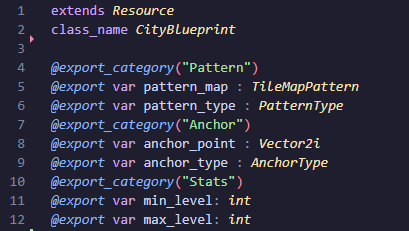
I even threw in some extra @export_category tags to group the fields in the Inspector panel. Makes it look professional.
With this, I can create as many Resource files as I want (1 per “Blueprint”) and load them dynamically with a quick method in my helper class:
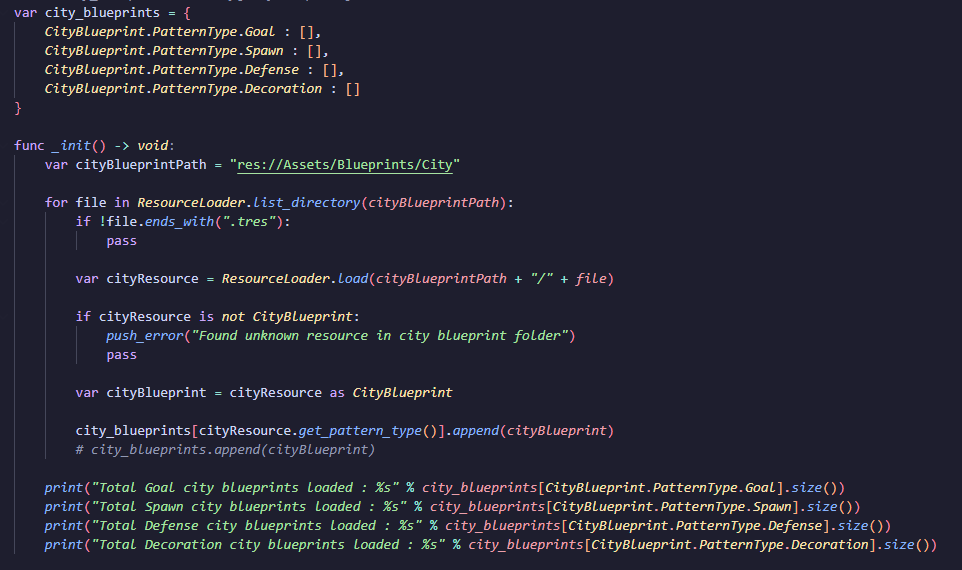
Now, it’s all a matter of adjusting my existing code to retrieve the pattern information from this collection of blueprints, instead of directly going to the TileSet.get_pattern(index). And I can adjust my blueprint-picking logic to be anything that I want, as long as I have the data for it!
Woah, just like that ? And how do you save your Resources ? Can you ’export’ the Pattern info somehow ?
That… Is the tricky part of all this. After all my research, I didn’t find any “one button push” solution in the Editor to copy/export the TileMapPattern data to a custom Resource file. It’s pretty easy to do in code - just retrieve the Pattern you want, assign it on our Resource, use the ResourceLoader class - but… Doing it manually it’s a chore.
Which is why…
Oh, let me guess. Something something custom plugin?
Something something custom plugin that’s being worked on, yes. Still with a lot of quirks, and only works with this Resource, but it’s functional.
But what if I want to do my own Custom Resource? And have my own plugin?
If you like this workflow I’ve created for myself, you’re more than welcome to send a message somewhere and I can try to help. I can’t write about everything else I’d spend all my free time doing just that.
…Fine! I guess that’s fair.
Good. And, think of it this way: it’s a good opportunity to practice some specific GDScript code. May come in handy in future gamedev-related issues.
With that… I think this is all for this blog post. A slightly different one since I focused on one particular aspect, but seemed like a good topic.
Hope this blog post was helpful in any way.
Got a question or just wanna discuss something? Feel free to reach out!
And thank you for reading!